cmsis-dap-webhid
Use CMSIS-DAP debug probes from a web page, over WebHID.
Halt a running ARM Cortex-M, single-step it, read its registers and dump its memory — from a browser tab, with no toolchain and no drivers installed.
Try it right now, nothing to install: debugger · flasher — Chrome or Edge, with a CMSIS-DAP board plugged in.
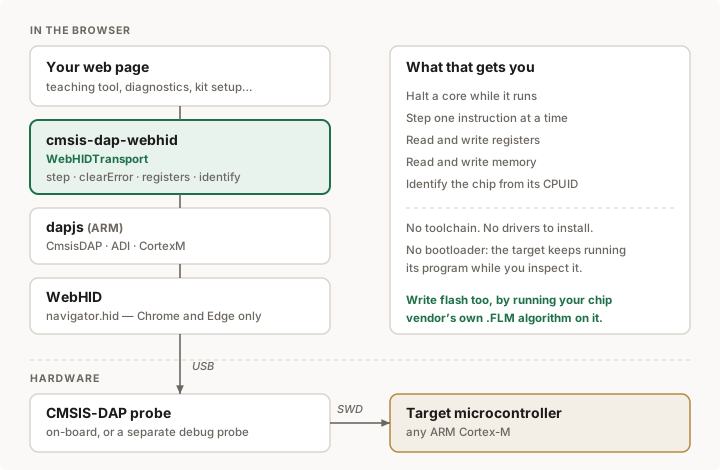
What it’s for
A CMSIS-DAP probe is a small piece of hardware that speaks SWD to the debug port of an ARM chip. Many boards have one built in, so the debugger is already sitting on the desk. What has been missing is a way to reach it without installing anything: normally you need OpenOCD, pyOCD or a vendor IDE, each with its own toolchain, its own drivers and its own bad afternoon.
This library removes that step. The browser becomes the debugger.
That matters in a few concrete situations:
- Teaching. Show a class what a program counter is by stepping one instruction at a time and watching it move. Send a link, not an install guide. No lab machine to prepare, no admin rights, nothing left behind.
- Diagnostics in the field. A board misbehaves at a customer site. Open a page, halt the core, read the fault registers and see where it stopped — on whatever laptop happens to be there.
- Hardware kits and products. Ship a web page that checks a board is alive, reads its serial number out of flash, or verifies it was programmed correctly. Buyers do not install anything.
- Test rigs and production lines. A browser tab as the operator interface, with the debug access built into it.
- Building better tools. This is a foundation. A full web debugger — with breakpoints, a memory viewer, source-level stepping — can be built on top.
The target keeps running its own program the whole time. This is not a bootloader upload: nothing is overwritten, nothing needs to be prepared on the chip. Debug access is a separate port that is always there.
How the pieces fit
Reading the diagram from the top down:
| Layer | What it does |
|---|---|
| Your page | Whatever you are building: a lesson, a test jig, a diagnostic tool |
| cmsis-dap-webhid | This library. Supplies the transport dapjs lacks, plus the debug helpers you need right after it |
| dapjs | ARM’s own library. Speaks the CMSIS-DAP command protocol and the ARM debug interface on top of it |
| WebHID | The browser API that lets a page talk to a USB HID device, once the user grants permission |
| CMSIS-DAP probe | The hardware, on the board or separate. Turns USB packets into SWD signalling |
| Target chip | Any ARM Cortex-M, reached through its debug port |
The user grants access to the probe once, from a click. From then on the page can reach it again without asking.
Why this exists
dapjs, ARM’s own library, ships transports for Node (node-hid, usb) and for the browser over WebUSB — but CMSIS-DAP v1 probes enumerate as HID devices. On Windows and macOS the operating system claims HID devices exclusively, so WebUSB cannot open them, and there is no WebHID transport in dapjs. The result is that the most common kind of probe cannot be reached from a browser at all.
This is that missing transport, written against the real wire protocol — 64-byte reports in both directions, report ID 0 — plus the handful of Cortex-M helpers you need the moment the link comes up.
import { requestTransport, identify, registers, trace, hex } from 'cmsis-dap-webhid';
import { CortexM } from 'dapjs';

// Must come from a click: WebHID requires a user gesture.
const transport = await requestTransport();
const target = new CortexM(transport);
await target.connect();

console.log(await identify(target));      // { core: 'Cortex-M4', ... }

await target.halt();
console.log(await registers(target));     // { PC: ..., SP: ..., LR: ... }
console.log((await trace(target, 10)).map(v => hex(v)));
await target.resume();
Install
npm install cmsis-dap-webhid dapjs
Or use it straight from a page, no build step:
<script type="module">
  import { requestTransport } from 'https://esm.sh/cmsis-dap-webhid';
  import { CortexM } from 'https://esm.sh/dapjs';
</script>
Requires Chrome or Edge. Firefox and Safari do not implement WebHID, and
have said they do not intend to. The page must also be served over HTTPS or
from localhost.
What you get
Transport
WebHIDTransport(device, options) |
The dapjs transport. Wrap a HIDDevice |
requestTransport(options) |
Ask the user for a probe, return it open |
getTransports(options) |
Transports for already-granted probes |
KNOWN_PROBES |
Vendor IDs of common probes, as a device filter |
Debug helpers
step(target) |
Execute one instruction. dapjs does not expose this |
trace(target, n) |
Step n times, return the PC at each stop |
state(target) |
Halted? sleeping? locked up? |
registers(target) |
All core registers at once |
identify(target) |
Which Cortex-M this is, from CPUID |
clearError(target) |
Recover from a stuck transfer. See below |
resetAndRun(target, {halt}) |
Reset, and actually let the board run |
readSafe(target, addr) |
Read, returning null for unmapped addresses |
probeMemory(target, addrs) |
Find where memory actually is |
Writing flash
parseFLM(buffer) |
Read a vendor .FLM: geometry, code and entry points |
FlashProgrammer(target, algo, opts) |
Run that algorithm on the chip |
.program(addr, bytes, opts) |
Erase the sectors and write the image |
.verify(addr, bytes) |
Read back and compare |
.eraseSector(addr) / .eraseAll() |
Erase without writing |
readFirmware(content, {name, address}) |
Read a .hex or .bin, with its address |
parseIntelHex(text) |
Segments, bounds and entry point of a .hex |
Vendor packs
fetchAlgorithm({pack, device}) |
Fetch the right algorithm for a chip, in memory |
openPackFile(blob) / openRemotePack(url) |
Read a pack without unpacking it |
selectAlgorithm(archive, {device}) |
Pick the algorithm a chip declares |
parseDescriptor(xml) |
Devices, memories and algorithms from a .pdsc |
Field notes
Everything that went wrong getting this to work, with the error text you actually see: docs/field-notes.md.
Written for anyone hitting the same walls — the transport that desynchronises after one lost reply, the flash algorithm that vanishes into an interrupt, the image that writes and verifies perfectly at the wrong address. None of it was documented anywhere; all of it was found with a board on the desk.
Things worth knowing
A failed transfer leaves the DAP stuck. Reading an unmapped address returns
a FAULT, and from then on every access fails until the error is cleared
through the ABORT register. Without clearError(), a single bad read means
reloading the page. readSafe() handles it for you.
Addresses from generic OpenOCD configs are not always right. On the Renesas
RA4M1, 0x1ffe0000 appears as the work area and faults; usable RAM starts at
0x20000000. probeMemory() exists to find out rather than assume.
Interrupts will eat your flash algorithm. The board is running its own
program, with its vector table in flash and its timers live. Resume the core to
run EraseSector and an interrupt fires immediately, the core jumps into the
application’s handler and never comes back to the breakpoint you set as the
return address. The algorithm appears to hang and the flash is never touched —
on a real RA4M1 the core ended up at 0x0000e4e6, deep inside the sketch.
FlashProgrammer sets PRIMASK and C_MASKINTS before every call, and clears
them afterwards so the new firmware does not run with its interrupts dead.
Resetting is not enough to make a board run. SYSRESETREQ restarts the
system, but the debug domain survives it: a core halted for flashing — which it
always is — comes out of reset still halted, and the board sits there until
someone presses the button. resetAndRun() requests the reset and then hands
the core back by clearing C_DEBUGEN. Pass { halt: true } to stop at the
reset vector instead, which is how you debug startup code.
Init failing is about the chip, not about you. Vendor algorithms inspect
the part before doing anything and refuse if its clocks or power mode would
make flash unwritable — and they report that as a bare 1. On a Renesas RA4M1
the check reads OFS1 at 0x404 to learn the internal oscillator’s frequency,
and accepts only four encodings; an Arduino Uno R4 WiFi has 0x3000 in that
field, which is none of them, so Init refuses before touching the flash.
Resetting the target first is usually enough. When it is not, prepare() runs
just before Init, with the target in hand, so you can set the chip up
yourself:
new FlashProgrammer(target, algorithm, {
  ramAddress: ram.start,
  prepare: async target => { /* switch clocks to something it accepts */ },
});
Getting a permission
WebHID only prompts from a user gesture, so requestTransport() has to be
called from a click. Once granted, the permission persists for that origin and
getTransports() returns the probe without asking again.
Note that a board in bootloader mode is a different USB device and needs its own permission.
Tested with
- Arduino Uno R4 WiFi (Renesas RA4M1, Cortex-M4) — its on-board CMSIS-DAP
reports itself as
TinyUSB CMSIS-DAP, 64-byte reports, report ID 0.
It should work with any CMSIS-DAP v1 probe. Reports of what does and does not work are welcome.
Writing flash
Nobody reimplements flash drivers. Every silicon vendor ships compiled
Init / EraseSector / ProgramPage routines in a .FLM file, and debuggers
copy those into the chip’s RAM and let the chip program itself. OpenOCD and
pyOCD both work this way, and so does this.
import { parseFLM, FlashProgrammer } from 'cmsis-dap-webhid';

const algorithm = parseFLM(await file.arrayBuffer());   // the vendor's .FLM
const flash = new FlashProgrammer(target, algorithm, {
  ramAddress: 0x20000000,        // where this chip's RAM starts
  ramSize: 0x8000,
});

await flash.program(0x0, firmware, {
  onProgress: ({ phase, done, total }) => console.log(phase, done, '/', total),
});
await flash.verify(0x0, firmware);
await target.reset();
Getting the algorithm
You supply the algorithm; none is bundled. Vendor .FLM files come with
vendor licences — the Renesas RA4M1 one, for instance, is Apache-2.0 from ARM
but carries a Renesas notice limiting use to Renesas parts. That is a
field-of-use restriction no free licence can pass on, so redistributing it here
is not an option.
What this library can do is fetch it for you, straight from the vendor’s own CMSIS pack, so the file reaches you from them under their terms. Name the chip and you get the right algorithm and the RAM settings it needs:
import { fetchAlgorithm, parseFLM, FlashProgrammer } from 'cmsis-dap-webhid';

const { data, ram, device } = await fetchAlgorithm({
  pack: 'Renesas.RA_DFP',
  device: 'R7FA4M1AB3CFM',      // a full part number works too
});

const flash = new FlashProgrammer(target, parseFLM(data), {
  ramAddress: ram.start,        // read off the pack descriptor, not guessed
  ramSize: ram.size,
});
Nothing touches the filesystem: the bytes come back in memory. The same from the command line, if you would rather have the file:
node tools/fetch-flm.mjs --search renesas
node tools/fetch-flm.mjs --pack Renesas.RA_DFP --device R7FA4M1AB
node tools/fetch-flm.mjs --pack Renesas.RA_DFP --device R7FA4M1AB --stdout
A .pack is a zip, and it is read in place. Range requests fetch the tail
to find the central directory, then only the bytes of the entry wanted: that
Renesas pack is 88 MB and the algorithm inside is 23 KB, so 23 KB travel, in
about two seconds. Extracted data is checked against its CRC.
In a browser
The code runs in a browser unchanged — but the vendor servers refuse
cross-origin requests. Measured from a GitHub Pages origin: keil.com, its
Azure mirror, packs.download.arm.com and www2.renesas.eu all fail CORS. The
library is ready; the hosts are not, and a public CORS proxy is a poor thing to
route firmware through.
So in a browser, hand it the pack instead. Download it normally — that is
ordinary navigation, not a fetch — and drop the .pack on the page:
const archive = await openPackFile(file);           // a File or Blob
const { data, ram } = await selectAlgorithm(archive, { device: 'R7FA4M1AB' });
Only the parts needed are read out of it, so a 90 MB pack does not become 90 MB
of memory. The flasher example accepts either a .FLM or a whole .pack.
Give it a .hex if you can
A .hex carries the addresses it belongs at. A .bin does not, so someone has
to know where it goes — and getting that wrong writes a perfectly good image to
the wrong place, where it verifies clean and then does not run.
import { readFirmware } from 'cmsis-dap-webhid';

const { address, data } = readFirmware(text, { name: file.name });
await flash.program(address, data);          // the file decided, not you
This is not hypothetical. Arduino’s Uno R4 sketches link at 0x4000, above a
bootloader at 0x0. Write one to 0x0 and you erase the bootloader — the board
stops answering USB altogether — while the sketch sits 16 KB below where its
own addresses point, so it does not run either. With a .hex neither happens.
readFirmware still accepts a raw binary, but insists on being told an
address rather than guessing one.
Examples
Both are self-contained pages, served from this repository. Nothing is uploaded anywhere: they talk to the probe from your own machine.
| debugger | Connect a probe, halt the core, step through instructions, dump memory |
| flasher | Feed it a .FLM and a .bin, and it writes one to the other |
Click Connect probe and pick your device; the browser asks once per site.
The source is in examples/. To run them locally, serve over HTTPS or
localhost — WebHID refuses to work otherwise.
Author
David J. Cuartielles Ruiz
Licence
GPL-3.0-or-later. See LICENSE.
If you use this library, your project must also be released under the GPL. That is deliberate: improvements to tooling like this are worth more shared.
dapjs is a peer dependency, licensed separately by ARM under Apache-2.0.
Apache-2.0 is compatible with GPLv3, so combining them is fine — but note it is
not compatible with GPLv2, which is why this is v3.